Why do so many PECOS enrollment applications experience avoidable Medicare approval delays? Small errors such as incorrect provider information, missing documents, or unanswered CMS requests can delay approval and Medicare billing privileges. In 2026, CMS continues to recommend electronic PECOS enrollment because online applications are generally processed faster and include built-in validation checks that help reduce common errors.
This guide explains the Common PECOS Enrollment Mistakes That Delay Medicare Approval, why they occur, and how they affect Medicare enrollment. It covers the most frequent errors reviewed by Medicare Administrative Contractors (MACs), practical corrections, and preventive steps that improve first-pass approval rates.
By the end of this article, you will know how to submit a complete PECOS enrollment application, reduce avoidable delays, and meet Medicare enrollment requirements. You’ll also learn key 2026 updates, including the fact that most physicians and non-physician practitioners do not pay a Medicare enrollment application fee, while certain institutional providers and suppliers remain subject to the 2026 application fee of $750, depending on provider type.
Why PECOS Enrollment Mistakes Delay Medicare Approval
Common PECOS Enrollment Mistakes That Delay Medicare Approval often result in additional CMS review, development requests, or returned applications. Understanding how Medicare evaluates enrollment applications helps providers reduce avoidable delays and protect their Medicare billing privileges.
How CMS Reviews PECOS Enrollment Applications
CMS uses the Provider Enrollment, Chain, and Ownership System (PECOS) to process Medicare enrollment, revalidation, and enrollment updates. After an application is submitted, the assigned Medicare Administrative Contractor (MAC) verifies the provider’s identity, licensure, ownership information, practice location, and supporting documents against CMS enrollment requirements.
The review also compares information with records maintained in systems such as the National Plan and Provider Enumeration System (NPPES) and applicable state licensing boards. If information is missing, inconsistent, or unsupported, the MAC may issue a development request or return the application for correction. A complete and accurate submission reduces processing delays and improves the likelihood of timely Medicare approval.
Common Reasons Medicare Approval Is Delayed
Most PECOS Enrollment Mistakes result from incomplete or inconsistent application information rather than system errors. Common issues that delay Medicare approval include:
1. Incorrect legal business name or Tax Identification Number (TIN)
2. NPI or taxonomy code mismatches
3. Missing supporting documentation
4. Expired professional licenses or certifications
5. Incorrect ownership or management of employee information
6. Missing electronic signatures or certification statements
7. Failure to respond to Medicare development requests within the required timeframe
8. Missed Medicare revalidation deadlines

How Enrollment Delays Affect Billing and Reimbursement
Delayed Medicare PECOS Enrollment directly affects a provider’s ability to bill Medicare for covered services. Until enrollment is approved and billing privileges become effective, claims may be held, rejected, or remain unpaid, depending on the provider’s enrollment status and applicable CMS policies.
These delays can disrupt cash flow, increase administrative workload, delay patient billing, and require additional follow-up from credentialing, billing, and revenue cycle teams. Submitting an accurate PECOS application the first time helps reduce these operational challenges and supports timely reimbursement.
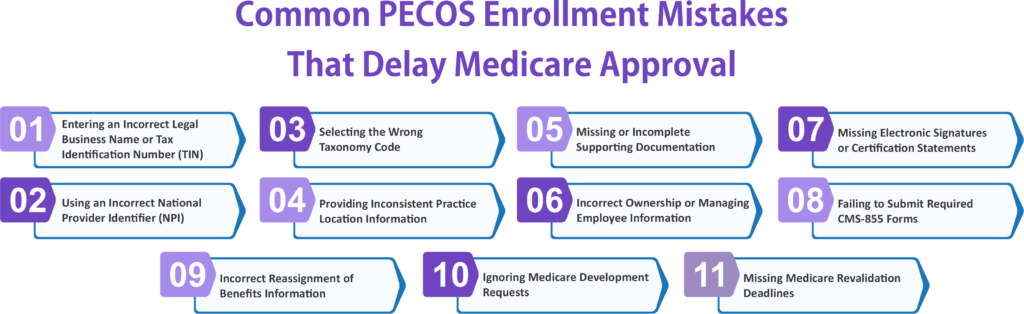
Common PECOS Enrollment Mistakes That Delay Medicare Approval
Common PECOS Enrollment Mistakes That Delay Medicare Approval often result from incorrect provider information, missing documentation, or incomplete enrollment records. Identifying these errors before submission helps reduce CMS review time and supports faster Medicare approval.
Entering an Incorrect Legal Business Name or Tax Identification Number (TIN)
The legal business name and TIN entered in PECOS Enrollment must match IRS records. Even small differences can trigger additional verification.
Common issues include:
1. Legal name does not match IRS records.
2. An incorrect or outdated TIN is entered.
3. Business name abbreviations create inconsistencies.
4. Using an Incorrect National Provider Identifier (NPI)
Using an Incorrect National Provider Identifier (NPI)
The NPI entered in PECOS should match the information maintained in NPPES. Incorrect or inactive NPIs commonly delay application processing.
Verify the following:
- Correct individual or organizational NPI.
- Active NPI status in NPPES.
- Consistent NPI across all enrollment documents.
Selecting the Wrong Taxonomy Code
Taxonomy codes identify a provider’s specialty and should accurately reflect the services provided. Incorrect codes can affect Medicare enrollment and future claim processing.
Avoid these mistakes:
- Selecting the wrong specialty code.
- Using an outdated taxonomy code.
- Choosing a taxonomy that does not match the provider’s license.
Providing Inconsistent Practice Location Information
Practice location details should remain consistent across PECOS, NPPES, and supporting documents. Address discrepancies often require additional review.
Review:
- Street address and suite number.
- ZIP code and city information.
- Practice and mailing addresses.
Missing or Incomplete Supporting Documentation
Missing documentation remains one of the most common PECOS Medicare Enrollment Errors. Every required document should be complete and current before submission.
Examples include:
- Professional licenses.
- Ownership documentation.
- Government-issued identification, when required.
Expired Professional Licenses or Certifications
CMS verifies professional credentials during enrollment review. Expired licenses prevent application approval until updated documentation is received.
Confirm that:
- Professional licenses are active.
- Certifications remain valid.
- Renewal dates have not passed.
Incorrect Ownership or Managing Employee Information
Organizations must report complete ownership and manage employee information. Missing disclosures frequently delay CMS review.
Verify:
- Authorized official information.
- Ownership percentages.
- Managing employee records.
Missing Electronic Signatures or Certification Statements
Applications lacking the required signatures cannot proceed in the enrollment process.
Before submitting, confirm:
- Electronic signatures are complete.
- Certification statements are signed.
- Authorized officials signed where required.
Failing to Submit Required CMS-855 Forms
Submitting the correct CMS-855 form is essential for accurate Medicare enrollment.
Common forms include:
- CMS-855I for individual practitioners.
- CMS-855B for group practices and organizations.
- CMS-855R for reassignment of Medicare benefits.
Incorrect Reassignment of Benefits Information
Errors in reassignment information may delay Medicare billing privileges for providers joining group practices.
Check that:
- Group practice information is accurate.
- Reassignment details are complete.
- Authorized signatures are included.
Ignoring Medicare Development Requests
CMS or the Medicare Administrative Contractor (MAC) may request additional information before approving an application.
Respond by:
- Reviewing every requested item carefully.
- Submit supporting documents before the deadline.
- Monitoring PECOS for status updates.
Missing Medicare Revalidation Deadlines
Providers must complete Medicare revalidation within the required timeframe to maintain active enrollment.
Best practices include:
- Track upcoming revalidation dates.
- Update provider information promptly.
- Respond quickly to CMS revalidation notices.
How to Prevent Common PECOS Enrollment Mistakes Before Submission
Common PECOS Enrollment Mistakes That Delay Medicare Approval can often be prevented with a thorough review before submission. Verifying provider information, supporting documents, and CMS enrollment forms helps reduce avoidable delays and improves the chances of timely Medicare approval.
Verify All Provider and Organization Information
Review every provider and organizational detail before submitting the application. Consistent and accurate information helps CMS process the enrollment without unnecessary follow-up.
Verify the following:
1. Legal business name and Tax Identification Number (TIN)
2. National Provider Identifier (NPI)
3. Practice address and contact information
4. State license and certification details
5. Authorized official information
Match PECOS Information with NPPES Records
CMS compares information in PECOS with records maintained in the National Plan and Provider Enumeration System (NPPES). Differences between the two systems commonly delay application processing.
Confirm that:
1. Provider name matches NPPES records
2. NPI information is current
3. Taxonomy codes are identical in both systems
4. Practice addresses are consistent
5. Contact information is up to date
Confirm Supporting Documents Before Submission
Incomplete documentation is one of the leading causes of enrollment delays. Ensure every required document is valid, complete, and uploaded before submitting the application.
Review documents such as:
- Active professional licenses
- Ownership or organizational documents
- CMS-required supporting forms
- Identification documents, if requested
Any additional documentation required by the Medicare Administrative Contractor (MAC)
Review CMS-855 Forms for Accuracy
Using the correct CMS-855 enrollment form and completing every required section reduces the risk of returned applications and processing delays.
Before submission:
- Select the correct CMS-855 form for the provider type
- Complete every required field
- Verify ownership and practice information
- Review signatures and certification statements
- Check for missing attachments
Respond Quickly to Medicare Requests for Additional Information
If CMS or the Medicare Administrative Contractor (MAC) issues a development request, respond within the specified timeframe. Prompt responses help prevent unnecessary delays and keep the enrollment process moving.
Best practices include:
- Monitor PECOS application status regularly
- Review every development request carefully
- Submit all requested documents before the deadline
- Keep copies of every response and supporting document
- Confirm that CMS has received the requested information
PECOS Enrollment Checklist Before You Submit Your Application
A final review before submission helps identify missing information and reduces avoidable enrollment delays. Use this checklist to confirm your PECOS Enrollment application is complete, accurate, and ready for CMS review.
Provider Information Checklist
Confirm that all provider details are accurate and consistent.
- Legal name matches IRS and licensing records.
- The National Provider Identifier (NPI) is active and correct.
- Taxonomy code reflects the provider’s specialty.
- Professional license is active and current.
- Contact information is complete and up to date.
Organization Information Checklist
Verify that all organization details match official records.
- Legal business name matches IRS records.
- Tax Identification Number (TIN) is correct.
- Practice and mailing addresses are consistent.
- Ownership and management of employee information is complete.
- Authorized official information is accurate.
Supporting Documentation Checklist
Ensure all required documents are attached before submission.
- Professional licenses and certifications.
- Ownership or business registration documents, if applicable.
- CMS-required enrollment forms.
- Any additional documents requested by the Medicare Administrative Contractor (MAC).
- Electronic copies are complete and legible.
CMS Form and Signature Checklist
Review enrollment forms carefully before submitting the application.
- The correct CMS-855 form has been selected.
- Every required field is completed.
- Certification statements are signed.
- Electronic signatures are valid.
- Required attachments have been uploaded.
Final Submission Checklist
Perform one final review to reduce the risk of processing delays.
- Compare PECOS information with NPPES records.
- Verify all dates, addresses, and identification numbers.
- Review the application for missing information.
- Save a copy of the completed application and supporting documents.
- Submit the application and monitor its status through PECOS.
Conclusion
Avoiding Common PECOS Enrollment Mistakes That Delay Medicare Approval begins with submitting accurate provider information, complete supporting documents, and the correct CMS enrollment forms. A careful review before submission helps reduce processing delays, protects Medicare billing privileges, and supports timely reimbursement.
Maintaining current PECOS records, responding promptly to Medicare development requests, and meeting revalidation deadlines are equally important after enrollment. Following these best practices helps healthcare providers, credentialing specialists, and revenue cycle teams maintain compliance and reduce future enrollment disruptions.
FAQs
What are the most common PECOS enrollment mistakes that delay Medicare approval?
Common mistakes include incorrect legal business names, TIN or NPI mismatches, wrong taxonomy codes, missing supporting documents, incomplete CMS-855 forms, and failing to respond to Medicare development requests.
How can I prevent delays in my PECOS enrollment application?
Verify all provider and organization information, match PECOS records with NPPES, submit complete supporting documents, review CMS-855 forms carefully, and respond promptly to any CMS or MAC requests.
What happens if my PECOS application contains errors?
If errors are identified, the Medicare Administrative Contractor (MAC) may issue a development request, return the application, or delay approval until the required corrections and supporting documents are submitted.
How do I check the status of my PECOS enrollment application?
You can monitor your application through the PECOS portal, where you can review processing updates, respond to development requests, and track your Medicare enrollment status until approval.
Why is Medicare revalidation important for PECOS enrollment?
Medicare revalidation keeps your enrollment information current and preserves your billing privileges. Missing a revalidation deadline can lead to enrollment deactivation and interruptions in Medicare reimbursement.