
Quick answer: A medical billing virtual assistant is a trained remote team member who handles rules-based revenue cycle work, such as eligibility checks, prior authorization follow-up, claim status calls, payment posting and A/R follow-up, through your practice’s own systems and under a HIPAA business associate agreement. Practices get the most from one when they delegate repeatable tasks, keep coding and financial decisions in-house, and measure the assistant’s output every week.
For most practices, the push comes from staffing. Front-desk and billing roles keep turning over, and local payroll keeps rising. So every resignation leaves payer calls and posting to pile up. Denials add to the pressure. For example, in Experian Health’s 2025 State of Claims survey, 41% of providers reported denial rates of 10% or higher (Experian Health).
That is why many practices add a remote billing support assistant to the team. This support can cut admin workload. However, practices must first check compliance, coding skill, data security and workflow fit.
This guide covers what a medical billing virtual assistant does, the coding basics the role needs, which tasks to delegate, the HIPAA controls to require, and how costs compare with an in-house biller.
Key takeaways
- Delegate rules-based work such as eligibility checks, prior authorization tracking, claim status calls and payment posting. Keep coding, write-offs and refunds in-house.
- Sign a business associate agreement before any access, then add named logins, minimum-necessary access, audit logs and monthly exclusion screening.
- Review a short dashboard every week and sample 10 to 20 worked accounts every month.
- Compare costs on a fully loaded basis: the same hours and the same tasks, including supervision and software.
- Pair the assistant with automation: software runs the routine checks, and the assistant works what the software flags.
Who Is a Medical Billing Virtual Assistant?
A medical billing virtual assistant handles remote billing and admin tasks that keep the revenue cycle moving. Below, we explain the role and how it differs from a general virtual assistant.
What Does a Medical Billing Virtual Assistant Do?
In short, a medical billing virtual assistant is a trained remote professional who performs medical billing tasks for healthcare providers, hospitals, clinics, and medical billing companies. Working through secure systems, they help manage billing operations without being physically present in the practice.
For example, their duties may include:
Insurance eligibility verification
Confirms coverage and benefits before the visit, so claims don’t bounce for an inactive plan.
Patient demographic verification
Checks names, member IDs and dates of birth, the small errors behind many avoidable rejections.
Charge entry
Enters coded services into the billing system accurately and on time.
Claim preparation and submission
Builds clean claims and sends them to payers electronically.
Payment posting
Records payer and patient payments against the right claims and flags anything that doesn’t match.
Denial follow-up
Finds out why a claim was denied, then corrects it or prepares the appeal.
Accounts receivable (A/R) support
Works unpaid claims before they age past filing deadlines.
Patient billing assistance
Answers balance questions and sets up payment plans with patients.
Difference Between a Medical Billing Virtual Assistant and a General Virtual Assistant
Both roles work remotely. However, their duties and the knowledge they need differ a lot. For front-office and clinical support roles beyond billing, see our guide to healthcare virtual assistant roles.
| Medical Billing Virtual Assistant | General Virtual Assistant |
|---|---|
| Performs healthcare billing tasks | Performs general administrative tasks |
| Understands medical billing workflows | Typically has no billing knowledge |
| Works with CPT, HCPCS Level II, and ICD-10-CM documentation | Does not require medical coding knowledge |
| Supports insurance claims and payment posting | Manages emails, scheduling, and data entry |
| Follows HIPAA compliance requirements | May not require healthcare compliance training |
| Uses EHR, PM software, and billing platforms | Uses standard office productivity software |
How a Medical Billing Virtual Assistant Supports the Revenue Cycle
A medical billing virtual assistant can support every stage of the revenue cycle, from registration to final payment. As a result, claims carry fewer errors, payments arrive sooner, and cash flow stays steady.
Patient Registration and Demographic Review
Accurate patient information is the base of clean billing. So the assistant first reviews patient demographics, insurance details, and contact information before services are provided.
For example, common tasks include:
- Verifying patient identity
- Confirming insurance information
- Reviewing referring provider details
- Updating demographic records
- Identifying missing or incorrect information
Insurance Verification and Eligibility Checks
Insurance verification confirms whether a patient’s health plan covers the scheduled services. When this step happens before treatment, billing delays and surprise denials drop.
Then the assistant typically:
- Verifies active insurance coverage
- Reviews benefits and coverage limits
- Confirms copayments, deductibles, and coinsurance
- Checks referral requirements
- Documents eligibility results
Prior Authorization Support
Many procedures, diagnostic tests, and specialty services require payer approval before treatment. Without it, the claim can be denied even when the service was medically necessary.
So the assistant helps by:
- Identifying services requiring authorization
- Preparing supporting documentation
- Submitting authorization requests
- Tracking approval status
- Updating provider and scheduling teams
Using a virtual assistant for prior authorization also helps practices keep up with newer payer deadlines. Under CMS’s Interoperability and Prior Authorization final rule (CMS-0057-F), Medicare Advantage plans, Medicaid and CHIP programs, and issuers on the federal marketplace must decide expedited requests within 72 hours and standard requests within 7 calendar days, starting January 1, 2026, and must give a specific reason for a denial.
Traditional Medicare and most commercial plans aren’t covered by that rule, so the assistant tracks each payer’s own timeline and escalates overdue requests.
Charge Entry
Next comes charge entry, which turns documented services into billable charges.
For example, the assistant handles:
- Reviewing encounter documentation
- Entering CPT, HCPCS Level II, and ICD-10-CM information
- Verifying provider details
- Confirming service dates
- Identifying incomplete documentation before claim creation
The assistant enters the codes the provider or a certified coder has assigned. Code selection itself stays with the provider or coder.
Claim Scrubbing
Claim scrubbing catches billing issues before claims reach the payer. As a result, clean claim rates rise and avoidable denials fall.
For example, the review covers:
- Coding accuracy
- Missing modifiers
- Patient demographic errors
- Insurance information
- National Correct Coding Initiative (NCCI) edit conflicts
- Required documentation
Electronic Claim Submission
Once claims pass internal review, they go out electronically through a clearinghouse.
During this process, the virtual assistant:
- Reviews claim completeness
- Confirms payer information
- Monitors clearinghouse acceptance reports
- Corrects rejected electronic claims
- Resubmits corrected claims when necessary
Payment Posting
Payment posting records what payers and patients pay. When posting is accurate, the books stay current and unpaid balances stand out.
In addition, the assistant handles:
- Posting Electronic Remittance Advice (ERA) payments
- Reviewing Explanation of Benefits (EOB) statements
- Recording patient payments
- Reconciling payment differences
- Identifying underpayments or overpayments
Denial Management
Denials delay payment and add admin cost. So the assistant reviews each denied claim, finds the cause, and prepares the fix.
For instance, common denial reasons include:
- Coding errors
- Missing documentation
- Eligibility issues
- Authorization omissions
- Duplicate claims
- Filing deadline violations
If the same denials keep coming back, our denial management team can handle the root-cause work.
Appeals Processing
Some denied claims qualify for appeal once the records are reviewed. In those cases, a strong appeal recovers money the payer should have paid.
Then the appeal work includes:
- Reviewing denial explanations
- Gathering clinical documentation
- Correcting billing errors
- Preparing appeal letters
- Tracking payer responses
However, have a coder or clinician review any appeal that argues clinical or coding points before it goes out.
Accounts Receivable Follow-Up
Accounts receivable (A/R) follow-up targets unpaid and partly paid claims. Because claims age quickly, regular follow-up keeps balances from going stale.
For example, typical tasks include:
- Reviewing aging reports
- Contacting insurance payers
- Following up on pending claims
- Correcting outstanding claim issues
- Updating payment status
Patient Billing and Collections
After the payer pays, patients may owe a balance. Clear statements and calls then help collections and keep patients satisfied.
Here, the assistant can also help with:
- Preparing patient statements
- Explaining outstanding balances
- Processing patient payments
- Establishing payment arrangements
- Responding to billing inquiries
Core Responsibilities of a Medical Billing Virtual Assistant
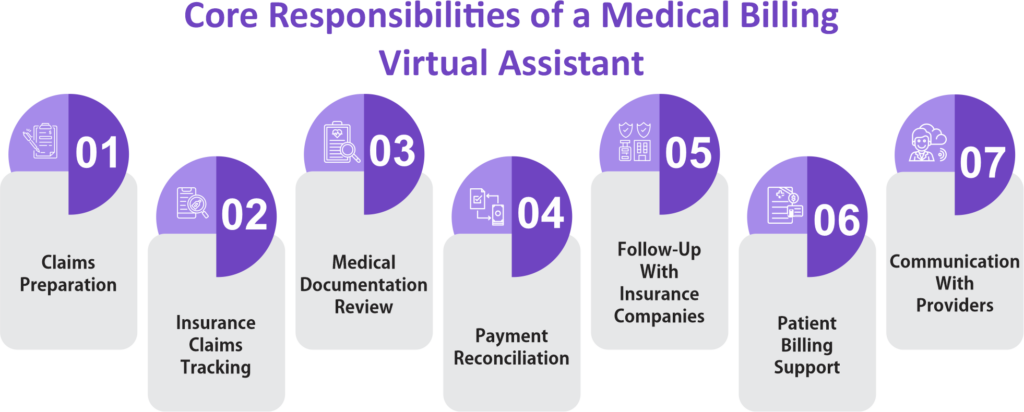
Beyond the stage-by-stage work above, a medical billing virtual assistant owns a set of daily duties. Together, they cut delays, protect documentation quality, and keep everyone informed:
- Claims preparation. Before a claim goes out, the assistant checks demographics, code documentation, modifiers, and provider and payer details, so the claim leaves clean.
- Claims tracking. After submission, the assistant watches clearinghouse reports, flags rejected or pending claims, and logs every status update.
- Documentation review. The assistant also confirms signatures and encounter notes, then reports gaps so the provider can fix them before billing.
- Payment reconciliation. Next, ERAs are compared with billed charges, so underpayments, overpayments and contractual adjustments are caught early.
- Payer follow-up. When a payer asks for more information, the assistant calls, answers record requests, and tracks the claim until it pays.
- Billing reports. In addition, the assistant prepares claim status, A/R aging, denial, payment and collection reports for the practice manager.
- Provider communication. Finally, the assistant asks providers to clarify notes, supply missing details, and answer coding questions, because small gaps become denials later.
Which Billing Tasks to Delegate to a Virtual Assistant
Not every duty above suits remote work equally. Tasks that follow a payer’s rules and leave a clear audit trail suit a virtual assistant. By contrast, tasks that need clinical judgment, coding decisions, physical presence or financial approval stay with your in-house team. For example, check-in payments rarely work remotely, because they need someone at the desk.
| Task | Fit for a virtual assistant | Guardrail or in-house owner |
|---|---|---|
| Eligibility and benefits verification | Strong | Set a cut-off, such as verified the business day before the visit |
| Prior authorization submission and tracking | Strong | Clinicians answer medical necessity questions; the clinic supplies records |
| Claim status checks and A/R follow-up | Strong | A biller or manager approves write-offs and escalations |
| ERA payment posting | Strong | In-house finance reconciles deposits to the bank |
| Denial triage and appeal packets | Good, with templates | A coder or clinician reviews clinical or coding arguments |
| Charge entry from coded encounters | Good | Code selection stays with the provider or a certified coder |
| Code assignment and coding queries | Keep in-house | Certified coder |
| Patient balance calls and payment plans | Partial | Hardship, discount and refund decisions stay in-house |
| Front-desk payments and check-in | Keep in-house | Front-desk staff, or a virtual medical receptionist for calls and scheduling |
Medical Coding Knowledge Required for Medical Billing Virtual Assistants
A medical billing virtual assistant should know the code sets and documentation standards behind every claim. Certified coders usually assign the codes. Even so, billing staff must understand coding rules so they can build accurate claims and spot problems early.
CPT Codes
Current Procedural Terminology (CPT®) codes describe the medical, surgical, and diagnostic services performed by healthcare providers. The American Medical Association (AMA) maintains these five-character codes, and Medicare, Medicaid, and most commercial insurance payers use them to process claims.
For CPT, a medical billing virtual assistant should be able to:
- Verify that CPT codes match the documented services.
- Check whether required modifiers are included.
- Identify missing or incomplete procedure information.
- Confirm that billed services are supported by provider documentation.
HCPCS Level II Codes
In addition, Healthcare Common Procedure Coding System (HCPCS) Level II codes identify products, supplies, medications, durable medical equipment (DME), ambulance services, and other healthcare items not included in CPT.
A billing assistant should understand how HCPCS Level II codes are used to:
- Bill medical supplies and equipment.
- Report injectable drugs and biological products.
- Submit claims for ambulance transportation.
- Support Medicare and Medicaid billing requirements.
ICD-10-CM Diagnosis Codes
ICD-10-CM diagnosis codes describe a patient’s medical condition, symptoms, injuries, or diseases. As a result, these codes establish medical necessity for the services on a claim.
So billing staff should verify that:
- Diagnosis codes support the billed procedures.
- The diagnosis is documented in the patient’s medical record.
- Code specificity meets payer requirements.
- Claims include the appropriate diagnosis sequence.
Medical Billing Modifiers
Modifiers provide additional information about a procedure or service without changing the CPT or HCPCS code itself. So they tell the payer how and where a service was performed.
A billing assistant should recognize common modifier situations, including:
- Services performed on separate anatomical sites.
- Distinct procedural services.
- Reduced or discontinued services.
- Multiple procedures during the same encounter.
- Professional and technical components.
Documentation Requirements
Complete records support every billed service and show that the care matches the claim. Otherwise, gaps lead to denials, payment delays, or audit findings.
Before preparing a claim, a medical billing virtual assistant should review documentation for:
- Patient demographics
- Date of service
- Provider signature, when required
- Clinical notes supporting medical necessity
- CPT, HCPCS Level II, and ICD-10-CM code documentation
- Required referrals or prior authorizations
National Correct Coding Initiative (NCCI) Edits
The Centers for Medicare & Medicaid Services (CMS) runs the National Correct Coding Initiative (NCCI) to promote correct coding and prevent improper payments. Its edits flag code pairs that generally should not be billed together unless specific conditions apply.
A remote billing assistant should understand how NCCI edits help:
- Identify incorrect code combinations.
- Detect duplicate billing.
- Review modifier requirements when applicable.
- Reduce avoidable claim denials.
- Support Medicare billing compliance.
However, if your denials point to coding accuracy rather than follow-up capacity, start with a medical billing and coding audit before adding remote staff.
Is a Medical Billing Virtual Assistant HIPAA Compliant?
Yes, when the right controls are in place. A HIPAA-compliant medical billing virtual assistant works under the same rules as any other business associate. Also, a signed agreement is only the first of several controls.
When a vendor’s staff create, receive, maintain or transmit protected health information for your practice, the vendor is a business associate, and HIPAA requires a business associate agreement before any access begins (45 CFR 164.502(e) and 164.504(e)). HHS publishes sample business associate agreement provisions your attorney can adapt.
Good to know: HIPAA doesn’t require a virtual assistant to be based in, or employed in, the United States. The same obligations apply wherever the work happens. Offshore arrangements do raise practical questions, such as where data is stored and how you’d enforce the contract, so cover them in the agreement and have your attorney review it.
The Controls That Make Remote Billing Safe
| Control | What it means in practice | Source |
|---|---|---|
| Business associate agreement | Signed before access. Covers permitted uses, safeguards, breach reporting, and return or destruction of data at the end of the contract. | 45 CFR 164.504(e) |
| Subcontractor agreements | Anyone the vendor uses signs an agreement with the vendor carrying the same terms | 45 CFR 164.502(e) |
| Minimum necessary access | Billing modules and the records the task needs, not full clinical charts | 45 CFR 164.502(b) |
| Unique logins and multi-factor authentication | One named account per person, never a shared login. Turn on multi-factor authentication too: it isn’t yet a specific HIPAA requirement, but HHS proposed making it one in January 2025. | 45 CFR 164.312(a)(2)(i) and (d) for unique IDs and authentication; MFA proposed in the 2025 Security Rule NPRM |
| Audit logs | Your systems record who opened what and when, and someone reviews them | 45 CFR 164.312(b) |
| Exclusion screening | Check each assistant against the HHS-OIG exclusion list (LEIE) before access and monthly after | OIG Special Advisory Bulletin on the Effect of Exclusion (2013) |
| Training and offboarding | HIPAA training before the first login; access removed the day the assignment ends | 45 CFR 164.308(a)(3), (a)(5) |
Often missed: Exclusion screening is the control practices most often skip. The OIG advises providers to screen contractors, including billing and coding contractors, against its List of Excluded Individuals/Entities, and it can impose civil money penalties when an excluded person furnishes items or services billed to federal health care programs. The OIG updates the list monthly, so screen monthly.
How to Hold a Virtual Billing Assistant Accountable
Remote billing work is easier to measure than desk work, because every task leaves a record in your system or a payer portal. So agree on the measures before the first day.
| Task | What to measure | Where you see it |
|---|---|---|
| Eligibility verification | Share of next-day visits verified by the cut-off | Daily schedule report |
| Prior authorization | Open requests by age; requests past the payer’s decision deadline | Weekly authorization log |
| A/R follow-up | Accounts worked per day; notes on every touch; trend in A/R over 90 days | Weekly A/R aging report |
| Payment posting | ERAs posted within your target days; unapplied cash remaining | Posting log and deposit reconciliation |
| Denials | Appeals filed before the payer’s deadline; denials sorted by root cause | Monthly denial report |
Tip: Set each target from your own baseline, not a published average. Then run a simple rhythm: the assistant logs each task in your system as it happens, a named in-house owner reviews a short dashboard every week, and once a month the owner samples 10 to 20 accounts the assistant worked and checks them against the payer record.
How AI and Automation Make a Medical Billing Virtual Assistant More Efficient
Automation now handles much of the repetitive data work in billing, and a medical billing virtual assistant gets more done alongside it. First, let software check rules, match payments and flag exceptions. Then let the assistant work those exceptions, call payers and keep the record accurate.
| Task | What automation can handle | What the virtual assistant does |
|---|---|---|
| Eligibility verification | Batch electronic checks (HIPAA X12 270/271 transactions) for the next day’s schedule | Works the plans that come back inactive, unclear or out of network, and calls the payer when the portal can’t answer |
| Claim scrubbing | Rules engines flag missing fields, invalid code pairs and payer-specific edits before submission | Fixes flagged claims and sends coding questions to the coder |
| Payment posting | Auto-posts electronic remittances (X12 835 ERAs) that match the claim | Posts paper checks, works unmatched or short payments, and reconciles exceptions |
| Denial management | Sorts denials by reason code and payer and surfaces trends | Builds appeal packets, follows up and reports root causes |
| Prior authorization | Payer portals today, and prior authorization APIs that CMS-0057-F requires Medicare Advantage, Medicaid, CHIP and federal marketplace plans to offer starting in 2027 | Gathers documentation, tracks payer deadlines and escalates stalled requests |
| A/R follow-up | Prioritizes the work queue by balance, age and filing deadline | Calls payers, documents every touch and escalates accounts that stall |
Guardrails for Using AI in Billing
AI tools follow the same HIPAA rules as people. For example, any vendor whose software creates, receives, maintains or transmits protected health information for your practice is a business associate and needs a business associate agreement before it touches patient data.
- Don’t let anyone paste patient information into a public chatbot or any AI tool that isn’t covered by a business associate agreement.
- Keep a person in the loop for code selection, appeals that argue clinical points and anything that changes what a patient owes.
- Check automated results: include auto-posted payments and scrubber overrides in the monthly account sample.
- Turn on the automation your practice management system and clearinghouse already include before you buy new tools.
Tip: Ask any virtual assistant vendor which automation and AI tools their team uses, whether a business associate agreement covers those tools, and who reviews what they produce.
Benefits of Hiring a Medical Billing Virtual Assistant
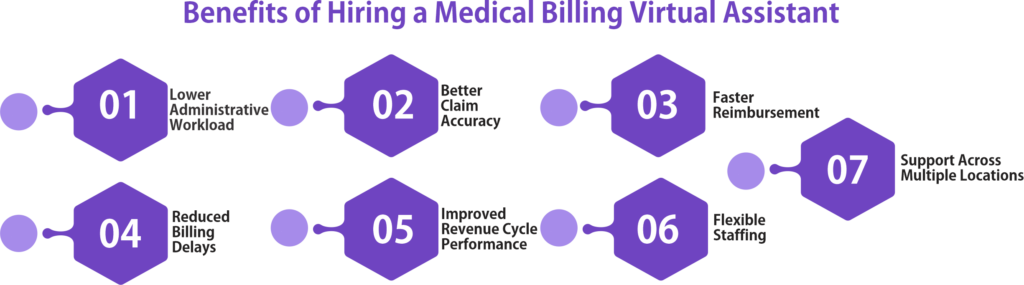
The benefits of a medical billing virtual assistant are real, but they depend on clear workflows, good training, secure system access, and payer and HIPAA compliance. When those are in place, practices usually see these gains:
Lower Administrative Workload
Administrative responsibilities such as insurance verification, claim preparation, payment posting, and accounts receivable follow-up consume significant staff time. When a billing assistant takes them over, providers and office staff get that time back for patients.
As a result, key advantages include:
- Less time spent on routine billing tasks
- Reduced workload for front-office staff
- Improved appointment scheduling efficiency
- Better allocation of internal resources
Better Claim Accuracy
Accurate claims get paid sooner and denied less. That is because the assistant reviews billing information before submission to identify missing documentation, coding inconsistencies, and demographic errors.
In turn, this support helps practices:
- Submit cleaner claims
- Reduce coding-related billing errors
- Improve documentation quality
- Decrease claim corrections after submission
Faster Reimbursement
Payers usually process complete, accurate claims faster. In addition, timely follow-up on pending claims removes needless delays.
Also, the assistant speeds payment by:
- Preparing complete claims
- Monitoring claim status
- Correcting rejected claims promptly
- Following up with insurance companies
- Posting payments without delay
Reduced Billing Delays
Billing delays may result from incomplete documentation, missing authorizations, incorrect patient information, or coding issues. So fixing these problems before submission keeps billing on schedule.
For example, the assistant reduces delays by:
- Verifying patient and insurance information
- Confirming prior authorization requirements
- Reviewing billing documentation
- Tracking claim progress
- Responding to payer requests for additional information
Improved Revenue Cycle Performance
Every stage of the revenue cycle affects the bottom line. Because the assistant works the same steps every day, the workflow stays consistent from registration to collection.
As a result, benefits include:
- Improved claim submission timelines
- Better accounts receivable management
- Lower denial rates
- More consistent payment posting
- Improved financial reporting
Flexible Staffing
Patient volume, seasonal demand, and staffing all change. Virtual billing support adds capacity without permanent on-site hires, so it helps when front-desk and billing roles turn over.
For example, flexible staffing can help practices:
- Manage temporary workload increases
- Support provider expansion
- Cover employee leave
- Assist with backlogged claims
- Scale billing operations as patient volumes change
Support Across Multiple Locations
Groups with several clinics often need central billing coordination. In that case, one remote assistant can support every location through secure cloud-based systems.
For example, common tasks include:
- Standardizing billing workflows
- Monitoring claims from multiple offices
- Coordinating communication with providers
- Tracking reimbursement across locations
- Supporting centralized revenue cycle reporting
Medical Billing Virtual Assistant Cost vs. an In-House Biller
Cutting overhead with virtual staff only works when you compare both options in the same units. In other words, compare fully loaded cost for the same hours and the same tasks.
For an in-house hire, start with wages. The Bureau of Labor Statistics reports a median pay of $51,140 a year for medical records specialists, the BLS category that covers medical coders, as of May 2025 (BLS Occupational Outlook Handbook).
However, billing and posting clerks are a separate BLS category with a lower median, so use the figure that matches the role you would otherwise hire. Then add benefits and payroll taxes, recruiting and training, software seats, and the cost of covering vacancies and leave.
For a virtual assistant, by contrast, ask each vendor to quote the same scope as one monthly figure, then check what the quote leaves out:
- Supervision time from your own staff
- Backup cover when the assistant is out
- Software licenses and secure remote access
- Onboarding and HIPAA training
- Exclusion screening and audit sampling
Claims of “up to 70% savings” rarely say what they’re measured against, so build the comparison from your own numbers. If you’re weighing a virtual assistant against handing billing to an outside company entirely, our comparison of in-house vs. outsourced medical billing covers that decision.
When a Billing Virtual Assistant Isn’t the Right Fit
- Your claim volume is very low. Part-time or shared help may cost less.
- Your real problem is coding accuracy. That needs a certified coder or a coding audit, not more follow-up capacity.
- Nobody in the practice can supervise. Without a named owner and a weekly review, remote work drifts.
- Payer or system terms restrict remote access. Check your EHR, clearinghouse and portal terms first.
A 30-60-90 Day Rollout for a Billing Virtual Assistant
Step 1: Days 1–30, set up and shadow
Sign the business associate agreement, run exclusion screening, create named logins with multi-factor authentication and limit access to billing modules. Then start with one task, usually eligibility verification, and review every result.
Step 2: Days 31–60, add tasks and targets
Next, add prior authorization tracking or A/R follow-up. Also agree on the weekly measures and start the dashboard.
Step 3: Days 61–90, audit and decide
Finally, run the first monthly account sample, compare results with your pre-launch baseline, and decide whether to expand the scope, adjust it or stop.
Bottom Line on Hiring a Medical Billing Virtual Assistant
A medical billing virtual assistant improves billing workflows, lowers admin workload, and keeps claims accurate across the revenue cycle. Because the role combines billing, coding, payer and HIPAA knowledge, it supports faster payment and stronger finances.
Before you add one, check experience, coding knowledge, software skills, compliance practices, and communication. Then delegate the rules-based tasks, keep coding and financial decisions in-house, put the compliance controls in writing, and review the work every week.
Frequently Asked Questions
Quick answers to the questions practices ask most about medical billing virtual assistants. Tap a question to open it.
What qualifications should a medical billing virtual assistant have?
A qualified medical billing virtual assistant should understand medical billing workflows, CPT®, HCPCS Level II, and ICD-10-CM coding principles, HIPAA requirements, insurance claims processing, and have experience using EHR, practice management, and medical billing software.
Is a medical billing virtual assistant the same as outsourcing billing to a company?
No. A virtual assistant works inside your systems and processes, and your practice keeps control of the billing workflow. An outsourced billing company usually takes over the whole process and is often paid a share of collections.
What happens to patient data when the virtual assistant contract ends?
The business associate agreement should require the vendor to return or destroy protected health information at termination where feasible, as 45 CFR 164.504(e) requires. Remove system access on the last day and keep a record that you did.
Which healthcare organizations benefit from medical billing virtual assistant services?
Medical billing virtual assistant services are beneficial for physician practices, hospitals, outpatient clinics, physical therapy centers, chiropractic offices, dental practices, behavioral health providers, home health agencies, and medical billing companies that need reliable remote billing support.
Will AI replace a medical billing virtual assistant?
Not for most practices. Automation handles rules-based checks and payment matching, but payers still need phone calls, appeals still need judgment, and someone has to own the exceptions. Practices get the best results by pairing the two: software runs the routine checks, and the assistant works what the software flags.