

What are the three different types of billing systems in healthcare? The three commonly used models are closed, open, and isolated billing systems. They differ mainly in how billing information is stored, shared, and connected with other healthcare systems.
A closed billing system keeps most information within a controlled environment. An open billing system connects with other applications and allows information to move between systems. An isolated billing system operates separately from the provider’s main technology environment.
These terms describe the structure and connectivity of a billing environment. They are not official CMS categories. CMS separately defines electronic claim transactions, including 837P professional claims and 837I institutional claims. CMS Medicare Fee-for-Service Companion Guides
What Are the 3 Different Types of Billing Systems in Healthcare?
The three models can be understood by looking at how information moves within and outside the billing environment:
- Closed billing system: Keeps most information within a controlled system with limited outside exchange.
- Open billing system: Connects with other healthcare applications and allows information to move between systems.
- Isolated billing system: Operates separately from the provider’s primary technology environment.
The main difference is connectivity. A closed system limits outside exchange, an open system supports broader connections, and an isolated system works largely on its own.
What Is a Healthcare Billing System?
A healthcare billing system is the technology and workflow a practice uses to manage the financial side of patient care. It can support tasks such as:
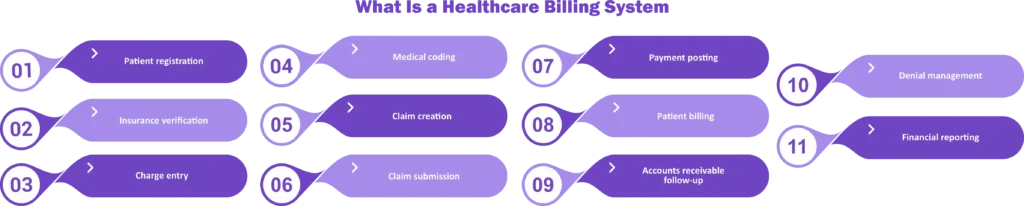
- Patient registration
- Insurance verification
- Charge entry
- Medical coding
- Claim creation
- Claim submission
- Payment posting
- Patient billing
- Accounts receivable follow-up
- Denial management
- Financial reporting
Some practices manage these functions through one integrated platform. Others use several systems that exchange information.
1. Closed Billing System
A closed billing system keeps most information and processes within a controlled environment. External systems may have limited access or require manual steps to exchange information. For example, a practice may use one platform to manage patient registration, billing, claims, and payment information without extensive connections to outside applications.
Benefits of a Closed Billing System
A closed setup can offer greater control over information and workflows. Staff may also have fewer systems to manage. Potential benefits include:
- Centralized billing information
- Fewer external integrations
- Greater control over user access
- Consistent internal workflows
- Simpler system management in some environments
However, a closed system can create problems when a practice needs to exchange information with outside applications. Manual data entry may increase the risk of duplicate work and errors. Staff may also spend more time moving information between systems.
When Does a Closed System Work Best?
A more self-contained setup may work when a practice has straightforward billing workflows and does not need extensive system integration. The key consideration is not whether the practice is small or large. It is whether the system can support the practice’s workflow without creating unnecessary manual work.
2. Open Billing System
An open billing system is designed to connect with other healthcare applications and exchange information. For example, a billing platform may connect with an EHR, clearinghouse, payment system, eligibility tool, or other healthcare technology.
Interoperability allows different systems to exchange and use health information. The Office of the National Coordinator for Health Information Technology (ONC) supports nationwide interoperability efforts and healthcare information exchange.
Benefits of an Open Billing System
An integrated billing environment can reduce repetitive data entry and help information move between connected systems. Potential benefits include:
- Better information exchange
- Reduced manual data entry
- Faster movement of billing information
- Improved workflow coordination
- Easier integration with other healthcare tools
- Better visibility across revenue cycle processes
However, integration does not automatically mean that every system will work together. Systems must support compatible standards, interfaces, and workflows.
When Does an Open System Work Best?
An open system may be useful for organizations that depend on multiple healthcare applications and need those systems to communicate. Larger practices, multi-location organizations, and healthcare organizations with complex workflows may have greater integration needs. However, the right choice depends on the organization’s specific technology environment.
3. Isolated Billing System
An isolated billing system operates separately from the provider’s primary technology environment. For example, a practice may use a standalone billing application that does not directly exchange information with its EHR or other systems.
When systems are not connected, staff may need to enter or transfer information manually.
Benefits of an Isolated Billing System
A standalone system can sometimes be easier to implement because it does not require extensive integrations. Potential benefits include:
- Simple setup
- Greater independence from other platforms
- Fewer integration requirements
- More control over the billing application
However, isolation can also create workflow challenges. Staff may need to enter the same information into multiple systems. This can increase administrative work and create opportunities for data-entry errors.
An isolated billing environment should also not be confused with a Personal Health Record (PHR). A PHR is a patient-managed health record, while an isolated billing system is a standalone technology setup used for billing-related workflows.
Closed vs. Open vs. Isolated Billing Systems
The main difference between these models is how information is contained or exchanged.
| System | Main Characteristic | Information Exchange | Potential Challenge |
| Closed | Mostly self-contained | Limited | Fewer outside connections |
| Open | Connected to other systems | Broad | Integration complexity |
| Isolated | Operates separately | Minimal or manual | Duplicate data entry |
Healthcare Billing Systems vs. Professional and Institutional Claims
Another important distinction is between billing system structure and claim type. CMS uses different electronic claim transactions for professional and institutional claims. Its Medicare Fee-for-Service Companion Guides provide guidance for both types of electronic claims.
Professional Claims
Professional claims are generally submitted using the 837P electronic transaction. These claims are commonly associated with services provided by physicians and other individual healthcare professionals.
Institutional Claims
Institutional claims are generally submitted using the 837I electronic transaction. These claims are used for institutional healthcare services and organizations such as hospitals and other facilities.
The important point is that 837P and 837I describe claim transactions, while closed, open, and isolated describe system structures. They are different concepts and should not be used interchangeably.
How Do Billing Systems Support the Revenue Cycle?
A healthcare billing system is one part of the broader revenue cycle. The revenue cycle begins before the patient receives care and continues until the provider receives payment and resolves any remaining balance. A typical workflow may include:
Patient registration → Eligibility verification → Charge capture → Coding → Claim submission → Payer processing → Payment posting → Denial follow-up → Patient collections
A well-designed billing system can help connect these steps and make it easier for staff to track claims and payments. For example, claim information can move from coding to claim submission. After the payer processes the claim, payment information can be posted, and remaining balances can be reviewed.
Practices that need additional support with claim preparation, submission, tracking, rejections, and related billing tasks can use medical claims processing services.
What Happens When a Billing System Does Not Fit the Practice?
The wrong billing setup can create problems across the revenue cycle. Common issues include:
- Duplicate data entry
- Delayed claim submission
- Missing patient information
- Claim rejections
- Payment posting errors
- Difficulty tracking accounts receivable
- Poor communication between systems
- Increased administrative workload
For example, if the EHR and billing platform do not exchange information properly, staff may need to manually transfer patient or charge data.
This can slow down the billing process and increase the risk of errors. A practice should review its workflow before selecting or changing a billing system.
How to Choose the Right Healthcare Billing System
The best healthcare billing system depends on the practice’s actual needs.

1. Practice Size and Workflow
Review how many providers, locations, patients, and claims the practice handles. A simple workflow may not require extensive integration. A complex organization may need more connected systems.
2. EHR Integration
Determine whether the billing system can communicate with the practice’s EHR. Good integration can reduce manual data entry and improve workflow consistency.
3. Payer Requirements
Review the needs of the practice’s major payers. The billing system should support the claim formats, electronic transactions, and workflows required by those payers.
4. Claim Management
Check whether the system supports claim creation, scrubbing, submission, status tracking, rejection management, and corrections. Effective claim management can help reduce avoidable errors before claims reach the payer.
5. Payment Posting
The system should support accurate posting of payer and patient payments. Accurate payment posting helps the practice identify unpaid balances and maintain reliable accounts receivable records. Practices that need specialized support can also use payment posting services.
6. Denial Management
A strong billing workflow should make it easy to identify, track, correct, and appeal denials. Practices with frequent denials may benefit from denial management services that address coding errors, documentation problems, medical necessity issues, appeals, and resubmissions.
7. Reporting
Look for reporting tools that provide useful information about:
- Claims
- Payments
- Denials
- Accounts receivable
- Aging
- Collections
- Payer performance
Good reporting helps management identify revenue cycle problems before they become larger issues.
How Medical Billing Services Fit Into the System
Technology alone does not guarantee an efficient billing process. Staff still need to enter accurate information, review claims, post payments correctly, follow up on unpaid accounts, and resolve denials. This is why practices may combine billing technology with professional medical billing and coding services.
For example, a billing team can review claims before submission, identify potential errors, monitor payer responses, and follow up on outstanding balances.
A practice may also use medical billing and coding audit services to identify coding, documentation, payment, and revenue cycle issues.
What Is the Difference Between a Billing System and Revenue Cycle Management?
A billing system is the technology and workflow used to manage billing-related activities. Revenue cycle management (RCM) is broader. It covers the entire financial process from patient access through final payment and account resolution. For example:
Billing system:
Helps create and manage claims.
Revenue cycle management:
Covers eligibility, coding, claims, payment posting, denials, accounts receivable, patient collections, and other financial processes.
A billing system can support RCM, but the two terms do not mean exactly the same thing. Practices can also use accounts receivable management resources to better understand how unpaid claims and outstanding balances affect the revenue cycle.
Final Takeaway
Closed, open, and isolated billing systems differ mainly in how they connect and exchange information. A closed system keeps most processes within a controlled environment, an open system connects with other applications, and an isolated system operates separately from the provider’s primary technology environment.
The best system depends on the practice’s actual needs. Before choosing one, consider EHR integration, payer requirements, claim management, payment posting, denial management, reporting, and the overall revenue cycle workflow.
The goal is not simply to choose the most connected system. It is to choose a billing environment that helps the practice process claims accurately, reduce unnecessary manual work, and collect payments efficiently.
Frequently Asked Questions
What are the three types of billing systems in healthcare?
The three commonly discussed models are closed, open, and isolated billing systems. A closed system limits outside connections, an open system connects with other applications, and an isolated system operates separately from other systems.
Is open billing better than closed billing?
Not necessarily. The better option depends on the practice’s workflow, integration needs, size, payer requirements, and technology environment. An open system can be useful when multiple applications need to exchange information. A more self-contained system may work when extensive integration is not needed.
What is an isolated billing system?
An isolated billing system is a standalone billing environment that operates separately from the provider’s main technology systems. Information may need to be transferred manually between systems.
What is an 837P claim?
An 837P is an electronic healthcare claim transaction used for professional claims.
What is an 837I claim?
An 837I is an electronic healthcare claim transaction used for institutional claims.
Are closed, open, and isolated official CMS billing categories?
No. These terms are commonly used to explain different system structures, but they are not official CMS categories of healthcare billing systems. CMS separately defines electronic claim transactions such as 837P professional claims and 837I institutional claims.
How does a billing system affect the revenue cycle?
A billing system can affect claim accuracy, submission speed, payment posting, denial tracking, accounts receivable, and reporting. A system that does not fit the practice’s workflow can increase manual work and billing errors.